Quick PDF to SVG conversion with Inkscape
Using Inkscape CLI
You can use Inkscape CLI to convert a file from PDF to SVG with the following command :
1inkscape "$pdf_filename" --export-plain-svg="$svg_filename"
A helper script
On macOS Inkscape is typically installed in
/Applications/Inkscape.app/Contents/MacOS/inkscape
To automatically convert a PDF file to SVG with the same base name you can use the following script :
 1#!/bin/zsh
 2
 3# Check if a filename is provided
 4if [ "$#" -ne 1 ]; then
 5    echo "Usage: $0 filename"
 6    exit 1
 7fi
 8
 9# Get the filename without extension
10filename="${1%.*}"
11
12# Construct the SVG filename
13svg_filename="${filename}.svg"
14
15# Execute the command
16/Applications/Inkscape.app/Contents/MacOS/inkscape "$1" --export-plain-svg="$svg_filename"
Quick Action on macOS
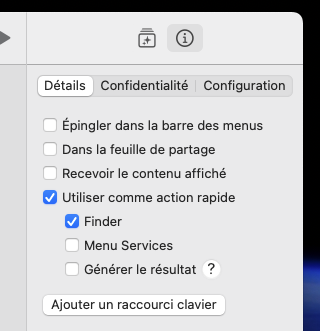
Using the Shortcuts application on macOS you can add a quick action to Finder to convert a PDF to SVG.
Create the following shortcut :
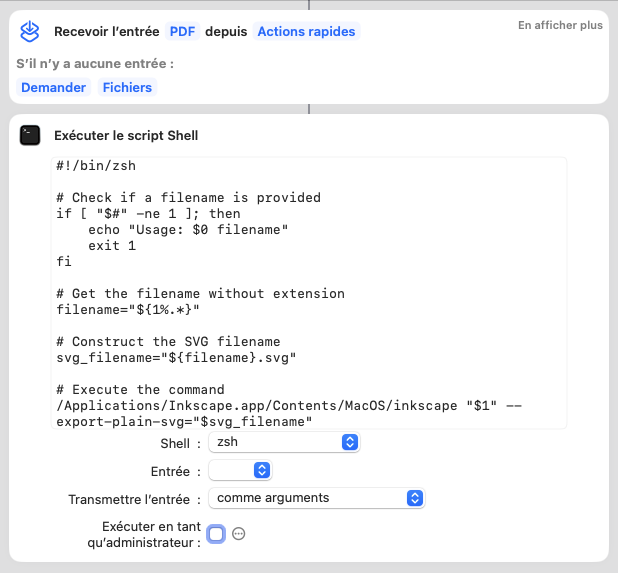
Add the shortcut to the Finder quick actions :